HF Winlink P2P drill 4/23 - 4/30 2025
When connecting I keep getting Incoming SID is invalid:
I am running the current version of RMS Express 1.7.22.0. I have not had this problem when making other P2P connections. Any ideas?
73,
WW5TOM
*** Winlink Vara Connection to N5WAJ @ 2025/04/23 22:47:16 USB Dial: 7067.000 Signal bandwidth 500 Hz
;FW: N5WAJ
[RMS Express-1.7.22.0-B2FHM$]
*** Winlink session connected to Peer-to-Peer station - disconnecting
Winlink session connected to Peer-to-Peer station
*** Incoming SID is invalid: [RMS EXPRESS-1.7.22.0-B2FHM$]
WW5TOM DE N5WAJ >
*** Disconnected from Winlink RMS: N5WAJ @ 2025/04/23 22:47:30
*** Session: 0.2 min; Avg Throughput: 0 Bytes/min; 1 Min Peak: 0 Bytes/min; Average SNR: -11.4 dB
To send your P2P select VARA HF P2P versus VARA HF WinLink.
Greg K5KYR
Thanks - Rookie mistake.
Tom WW5TOM
Results as of this posting: 21 P2P messages successfully received; replies posted awaiting stations reconnecting
Observations:
- several connections attempted not in the Vara HF P2P session type (this is why we practice)
- adding seconding addresses as a CC or in the primary To: this is strictly Peer to Peer no other routing unless that To or CC addressee connects to the P2P station
Drill continues! 73 and thanks, Dave WB5HJV
Great Idea for our group I know RACES does that quite often at the state level would you mind if we copy your idea? Have a great day. 73
I prepared a P2P message yesterday and placed it in my Outbox. I connected to N5WAJ 4 or 5 times. Each time there was a complete handshake of information and N5WAJ signs off saying that no messages were sent or received and the message was never leaves my Outbox.
I figure I must be doing something wrong, but we have run HF (40M) and VHF VARA P2P tests out here in the Katy area and I’ve never had a problem. I’m worried that I may have inadvertently changed some setting in Winlink that I can’t figure out.
I guess if all else fails I’ll delete that message and create another.
Sounds like you might have setup message in outbox as a normal WinLink versus as a P2P. That would explain why it will not transmit
Make sure that the message in the outbox is saved as P2P
Newbie here… is there a step by step guide to get started with this?
Just got a new laptop specific for ham use so hopefully it will be enough.
Just remember the following;
Both stations have to be in the same mode (P2P)
Both stations have to be on the same frequency
Both stations have to be on and listening (the receiving station for sure)
Most P2P Vara HF set up use a bandwidth of 500hz
ACL to less than 1/3 on transmit
The message must be posted to the out box as a P2P message. Outbox will show P2P for that message,
And consider other things such as distance, conditions, type of antenna (Vert for distance, NVIS for close).
Good Luck, John N5TIM
Found this, see if it helps!
(attachments)
WinlinkPeerToPeerMessaging.pdf (125 KB)
I think perhaps the most valuable aspect of such an exercise is to demonstrate that this is NOT the way to do things except as a last resort. It does work but so much more flexible to be able to connect with a station where you have good propagation on a clear frequency without the communication overhead of coordinating a dedicated frequency, tying up a radio and limiting yourself to a single addressee.
Tom N5TW
Beg to disagree. The ARC, as well as Harris County OEM, use this mode of P2P all the time. It is an important part of the COMMS plan.
WA5LEE
Lee Glassman, ARRL/ANCHORAGE VE, COM-L, COM-T, AUXC,
**RADO, ITSL, NREMT #**E3525310
Tomball, Texas
Pronouns: Him/He
HCOHSEM AUXCOMM
Tom,
Tom,
That was one of my documents. Could you tell me where you found it?
If you see any errors let me know please.
Thanks, John N5TIM
Are you sending as a Peer to Peer Message?
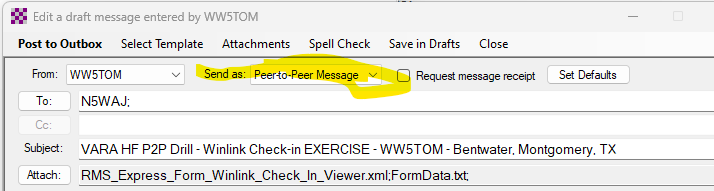
As I said, it can be made to work but folks should not be led to believe it is the right answer for most communication.
Tom N5TW
P2P is a backup plan to the fastest way to deliver the message. I personally delivered one during Ike from TranStar to the DDC. That is my 1 message sent P2P under duress.
Who is communicating “all of the time” via this method? Real emergency or practicing?
And what comms plan? P2P is not even a part of the STX ARES plan.
Jeff Walter
ARRL STX SEC
Beg to disagree. The ARC, as well as Harris County OEM, use this mode of P2P all the time. It is an important part of the COMMS plan.
WA5LEE
Lee Glassman, ARRL/ANCHORAGE VE, COM-L, COM-T, AUXC,
**RADO, ITSL, NREMT #**E3525310
Tomball, Texas
Pronouns: Him/He
HCOHSEM AUXCOMM
I did not SAY it was part of the ARES plan. I know it is not, just as DMR is not.
I was simply stating that ARC (Ask Dave) and HC OEM has it as part of THEIR comms plans. In the radio room as well as mobile and from home, I have done extensive tests to and from TranStar, using P2P, as well as nbems modes such as MT63.
While I am an ARES member and fully support it, my main focus is how best we, as amateur radio operators, can best serve HCOHSEM as the AUXC team. As Brett made clear Monday, as well as Joey made clear before he left, they do not care what club/group/organization you are a member of. If you want to assist them during events or emergencies, they will only grant access to AUXC trained individuals.
WA5LEE
Lee Glassman, ARRL/ANCHORAGE VE, COM-L, COM-T, AUXC,
**RADO, ITSL, NREMT #**E3525310
Tomball, Texas
Pronouns: Him/He
HCOHSEM AUXCOMM
When power is lost and repeaters go down. Finding a station that is up is the 1st challenge. VARA HF P2P is an excellent option to communicate as a backup. This practice is excellent!!